Turn your Meevo MR200 report into personal stylist insights.
Your employee sales report is more than a list of appointments. Use it to explore the clients, services and sales behind your own performance—with guided setup on the StylistStats website.
For professional hairstylists, including commission-based salon employees. Report upload, not a direct account connection or automatic sync.
Built around your own work
For the stylist behind the report.
If your salon uses Meevo and you have an authorized copy of your own MR200 report, StylistStats can help you understand your personal client history and performance.
Commission-based employees can enter their own service rates. Booth renters and independent stylists can use the reports too; sales totals and commission calculations remain separate measures.
Report access depends on your salon’s permissions. Ask your manager or administrator for an authorized copy of your own report if it is not available to you.
Before you upload
Start with MR200: Employee Sales.
Use the employee-level Excel report, rather than a summary-only spreadsheet or a picture of the report.
The supported workbook
Use an Excel .xlsx workbook containing one MR200 employee report.
Keep the employee heading, dated sections, client names, transaction IDs, service descriptions, quantities, prices and report totals intact.
Include the complete report, with product and tip sections if present.
Upload the workbook itself; PDF files and screenshots are not supported MR200 inputs.
What happens to the detail
The importer reads dated service and product lines, including continuation lines and zero-price services. Tips are recorded separately from sales and calculated commissions.
Report totals are checked against the details when supplied. An incomplete or unsupported workbook may need correction before it can be imported.
MR200 does not supply your commission rates. You enter those when creating services.
Meevo report access and export options vary by salon permissions. Ask your salon administrator for the report; this guide does not assume a particular Meevo menu or account access level.
The guided import
From report to organized history.
01
Upload your MR200 report
Use the report you already receive or can export from your salon’s Meevo system. Upload an authorized copy of your own employee report on the website.
02
Organize your services
Follow guided steps to create services and categories or match imported services to existing ones. Enter the commission rate for each new service.
03
Explore your performance
Review client patterns, retention and sales on the website, then access supported insights from the mobile app with the same account.
Choose where each item belongs.
Create a service and category together, map an item to a service you already use, or explicitly skip an item. Enter a commission rate for each new service—even if your rate is 0%.
Keep the actual sales amounts.
Suggested catalog prices help with setup, but imported sales retain their report amounts. Your account remembers service mappings; later uploads ask about new items or mappings that need to be restored.
Review the employee and import summary before confirming. Saved Skip choices change what is included.
For stylists and salon employers
Personal performance insights, with clear data boundaries.
Use an authorized copy of your own Meevo MR200 employee report to understand retention, services, sales and commission trends. StylistStats works from the report you upload and does not connect directly to your salon’s Meevo account.
Client names and transaction history are stored to provide these analytics; the MR200 importer does not import client email addresses, phone numbers or birthdays.
The workbook itself is uploaded for processing. Only upload records your salon has authorized you to use.
Compare return rates for new and existing clients.
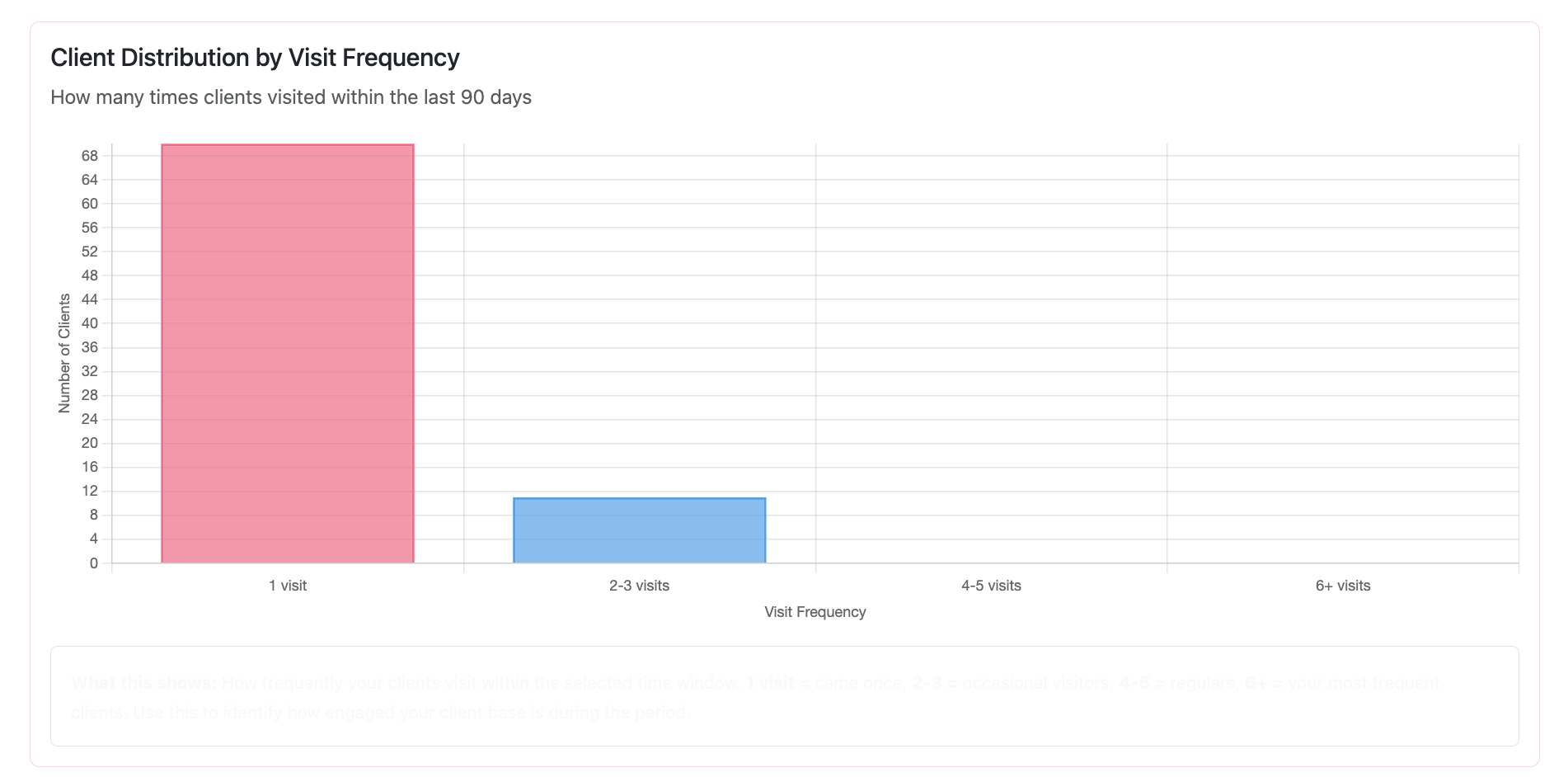
Explore observed return windows and visit frequency.
Review clients who haven’t returned within a window you choose.
See which services contribute to sales.
Compare sales, tips and calculated commissions over time.
Past return patterns are observations, not guaranteed bookings. Calculated commissions are based on the rates you enter, not actual payroll or take-home pay. Business projections, where used, are scenarios based on assumptions.
Actual product screenshot. Displayed report values are an example, not promised results.
Website to mobile
Set up on the web. Check in from your phone.
Upload and organize your report on the website. Once it has been imported, use the same account in the mobile companion app to view supported client, sales, commission and retention insights.
The mobile app does not upload MR200 files. New report uploads, account creation and subscription management happen on the website. Analytics reflect the history you have uploaded; there is no live Meevo synchronization.
StylistStats also supports custom CSV and Excel imports with report templates and service mapping. Depending on the file, you may need to identify columns or adjust the format. Manual sale entry is available too.
Uploads contain client names and transaction history. Use authorized records and review the privacy policy.
Does StylistStats work with Meevo?
Yes. Upload your Meevo MR200 Employee Sales report to StylistStats and follow guided service mapping. This is a report import, not a direct Meevo account connection or automatic synchronization. StylistStats is an independent product, not an official Meevo partner.
Which Meevo report should I upload?
Use an authorized copy of your own MR200: Employee Sales report as an Excel .xlsx workbook, with one employee report per workbook. Keep the employee heading, dated transaction details and totals intact.
How do I organize imported services?
For an unfamiliar item, create a service and category, match it to an existing service, or choose to skip it. Enter a commission rate for every new service. Your account remembers those mappings; later uploads ask about unfamiliar items or mappings whose service was deleted.
Can commission-based salon employees use StylistStats?
Yes. StylistStats is for professional hairstylists, including commission-based salon employees, booth renters and independent stylists. Use an authorized report of your own work and enter the service commission rates that apply to you. Calculated commissions are not payroll or take-home pay.
Do I upload my report on the website or mobile app?
Upload and organize your report on the StylistStats website. After importing, sign in to the mobile app with the same account to view supported sales, client and retention reports. Report uploads and subscription management are website workflows.
Can I use StylistStats without Meevo?
Yes. The website supports custom CSV and Excel imports with report-column and service mapping, plus manual sale entry. Other report formats may need setup or adjustments; they are not automatically compatible with MR200 import.
What if I do not have access to my report?
Access depends on your salon’s permissions. Ask your manager or salon administrator for an authorized copy of your own MR200 report. Do not upload another stylist’s data without authorization. If a report is unavailable, manual sale entry or a supported custom import can be an alternative.
Your own performance, in focus
Put your Meevo report to work for you.
Start a 30-day free trial with no credit card required at registration.